

November 3, 2026
Turning a repair shop device list into a battery order list
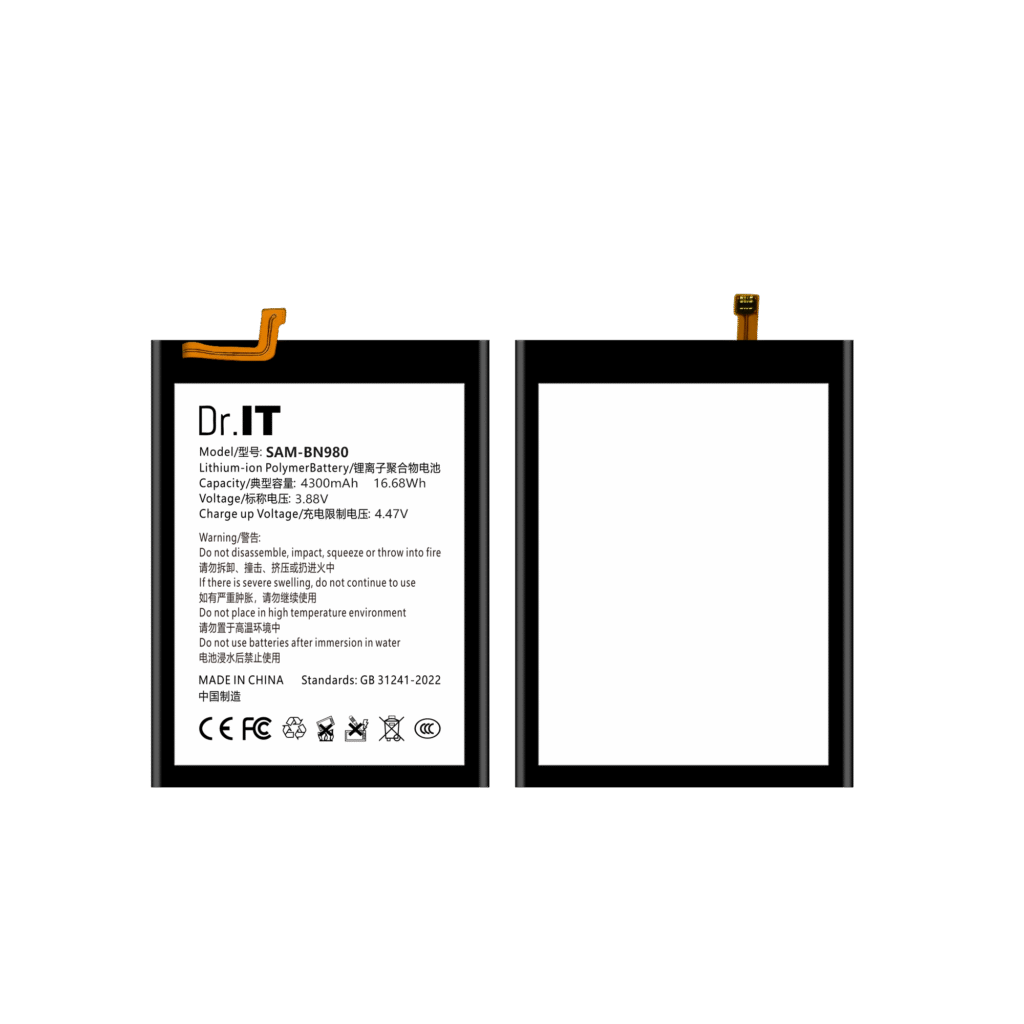
The easiest way to buy replacement batteries is to start from the catalogue: pick the models that look popular, order a few of each and see what sells. It works until the shop’s actual demand does not match the catalogue’s popularity, until a device turns up that nobody stocked, or until the same phone model needs two different battery references and only one of them is on the shelf. Buyers who start from their own device mix rather than from the catalogue get an order list that matches the work they actually do.
This guide is for repair shops, distributors and buyers who order replacement phone batteries. It walks through turning a service history into a buying list: what to pull out of the job records, how to map device versions to battery references without guessing, how to attach the label data to each reference, how to decide how deep to go on each one, and how to keep the list alive as the device mix changes. It is written from the buyer’s side of the counter.
Start from the job records, not from the catalogue
Most repair businesses already hold the raw material for this in their own records. Every job is a data point: which device came in, which device version it was, what was replaced, and when. A month or a quarter of those records answers the question a catalogue cannot: which battery references does this business actually consume, and in what proportion.
| Field | Why it is needed | Common mistake |
|---|---|---|
| Device brand and model | Groups the records into candidate references | Recording the marketing name only, with no version |
| Device version or region variant | The same model can be sold with different battery references | Assuming one model always takes one cell |
| Job date | Separates a seasonal or one-off device from a steady one | Counting every device ever seen, including one-offs |
| Battery reference if already known | Shortens the mapping work considerably | Leaving it blank even when the old cell is on the bench |
| Whether the battery was a repair or an upgrade | Upgrades to a different cell type behave differently from like-for-like repairs | Mixing the two in one count |
Two of those mistakes are worth dwelling on. The first is counting devices rather than repairs: a shop that fits a screen once a month may not need a battery reference at all. The second is assuming that a model name maps to a single cell. Device versions within a model can take different references, and the way to find out is to look at the cell itself, not at the model name.
Map device versions to references by looking at the cell
For each candidate device, the mapping is confirmed from a physical cell: read the artwork model text and the label values, and match that reference against what the device takes. This is a short, physical check, and it is the point where most buying errors are either caught or created. The fitment checklist sets out the checks in order — connector type and orientation, dimensions, flex position and the device version — so the mapping rests on evidence rather than on a supplier’s compatibility list.
Where a device takes more than one reference, record both with the reason, because the shop’s demand may be split between them. A screen replacement on one device version and a battery replacement on another can leave two references in circulation for what looks like the same phone, and the order list has to reflect what is really being fitted.
Attach the label data to every line
Once a reference is confirmed, the line on the order list should carry the data that makes it checkable: the catalogue code, the artwork model text, the label capacity and the nominal voltage, and separately the charge-limit voltage. Keeping these together is what allows the line to be compared against another supplier’s offer, checked against the goods on arrival, and re-ordered later without being re-derived. The model code guide explains why the code alone is not enough and how to read the artwork text, and the label guide covers each label field, including the watt-hour figure and what to do when it does not reconcile with the other two.
Where a catalogue page exists for the reference, it states the artwork text and the label values, so the order list can be built from the same figures the quotation is based on — for example the BN980 (4300 mAh, 3.88 V), the BN58 (5160 mAh, 3.87 V) and the BS908 (5000 mAh, 3.88 V).
Decide depth by demand, not by enthusiasm
A device list says what to buy; it does not say how much. The depth decision comes from three inputs: how many of that reference the shop consumes in a period, how long the shelf takes to turn over, and how costly a stock-out is. A reference that is used weekly and has a slow replenishment cycle needs a deeper holding than one used weekly with quick replenishment, even though both appear equally often in the records.
The stock planning and reorder points guide turns those inputs into cover weeks per model and an order quantity, and it is the step that stops a device list from turning into an over-order. A useful discipline is to start with the references that account for most of the volume, order those properly, and keep the long tail as a small standing quantity rather than a deep stock.
Turn the list into an order file, and ask the same questions of every supplier
The finished list has one line per reference with the code, the artwork text, the label values and the quantity, and it is the document sent out as a quotation request and kept as the record of what was agreed. The mixed-model order list guide shows the format that works for this, and the wholesale RFQ template carries the same lines into a request for pricing, packaging and shipping details.
Sending the identical file to every supplier is what makes the answers comparable, and it is also what makes a repeat order quick: the second order is the same file with updated quantities, not a fresh conversation. Keep the confirmed configuration for each reference, because it is the reference point for any claim about what should have arrived — the sample approval record holds that, and the returns procedure guide covers what to do when something does not match it.
Keep the list alive
A device list decays. New device versions appear, old ones drop out of the mix, and a reference that mattered two years ago may now be a single order a year. Two habits keep it useful: review the mix on a fixed cycle and compare it with the previous one, and update the list the moment a new device version shows up rather than at the next order. Any reference with no demand in the review period should be reviewed for removal from the standing order, and kept in the model file in case it returns.
The result is a buying document rather than a shopping list: it is derived from the work the business does, it is checkable line by line, and it can be sent, compared and re-ordered without being rebuilt. Availability, order minimums, delivery timing, after-sales conditions and the document set for your shipment are confirmed in writing for each enquiry, and you can send a model list with quantities and destination through the DoctorIT quotation page.
Battery installation and handling should be carried out by trained technicians, and lithium-ion batteries must be stored, transported and disposed of in line with the applicable local rules and the carrier’s requirements.
When a unit is held back as damaged, the reference line and the batch reference are what make the claim settleable; the damaged battery guide lists what to record.