

November 8, 2026
When a battery reference changes: how to handle artwork and batch changeovers
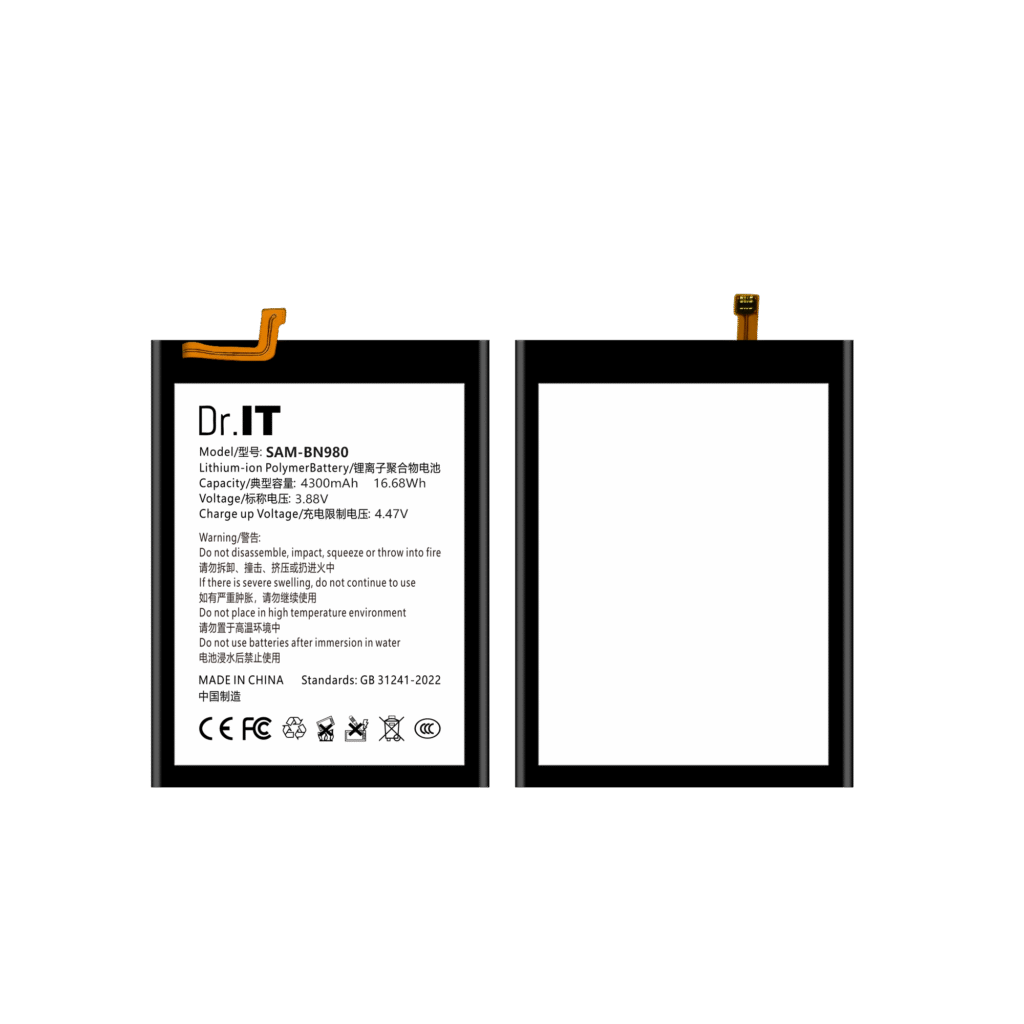
A catalogue code is a promise about a reference. The artwork printed on the cell is a promise about a specific unit. They usually agree, and when they agree a buyer can order from the code and check the goods against the label. But a reference can also be produced in more than one artwork version, and the version that arrives is not always the version in the catalogue image that was on screen when the order was placed. This guide is for repair shops, distributors and OEM buyers of replacement phone batteries, and it covers how to notice a changeover, how to keep it from reaching your shelves, and what to do when mixed stock has already arrived. It is written around one recurring practical problem: a buyer who orders on a code and inspects on artwork needs a defined way to handle the case where the two no longer match.
Why the artwork can change under the same code
There are ordinary commercial reasons for a reference to appear with different artwork over time. A customer-specific label replaces the standard one. A print error is corrected. A production batch is produced with a different capacity print while the cell itself is unchanged. A reference is reorganised internally and the artwork text is aligned with the new structure. None of these is unusual, and none of them is a fault on its own — the difficulty is that the buyer usually finds out at receiving, when the goods are already in the warehouse and the stock system has already been updated with the new code.
Detection therefore has to happen earlier than receiving. The catalogue data guide sets out why the artwork image is the only record that shows what is printed on the cell, and the battery label guide covers the fields to read off it. This article covers what to do when the artwork you receive is not the artwork you ordered against.
The four cases you will actually meet
| Case | What it looks like | What to do |
|---|---|---|
| Code and artwork both unchanged | The label matches the catalogue image field for field | Normal receipt; record the batch reference against the stock line as usual |
| Code unchanged, artwork text changed | The cell carries a different model text or a different printed value | Treat it as a changeover: get written confirmation of which artwork applies to the batch being shipped, and decide before the goods are put away |
| Code changed, artwork unchanged | A new catalogue code appears with the same artwork as before | Usually a rebranding or a reorganisation; confirm that the cell specification behind it is unchanged before treating the two codes as the same stock |
| Catalogue image replaced | The image on the product page is not the image you approved | Ask which batch the new image shows, keep the earlier artwork image on file for the stock you already hold, and date both |
The second case is the one that costs time, because nothing on the outside of the box signals it: the reference still fits, the code still matches the order, and only the label tells a different story.
How to catch it before it reaches the shelf
- Order against two fields, not one. Put the catalogue code and the artwork model text on the same line of your order. If the goods arrive with a different artwork text, the mismatch is visible immediately rather than at a claim.
- Check the sample against the artwork text. The sample approval checklist should include a photograph of the label and the batch reference, dated. When a new batch is approved later, approve it as a new sample rather than extending the old one.
- Ask where the batch reference is printed. If the batch or lot reference is on the cell or on packaging that stays with it, a changeover can be traced. The buying unit guide covers where that reference has to sit for the chain to hold.
- Ask what the supplier will do on a changeover. The useful answer is a notification in advance of a shipment whose artwork differs, not an apology afterwards.
When mixed stock has already arrived
If two artwork versions of the same reference are already in the warehouse, the priority is to stop them being merged. Separate them physically, label the shelves with the artwork text and the date range of each stock, and keep the older artwork image on file with the date it was approved. Do not merge them under one code in your own listing: the two artworks are then different products with the same label on your site, which is exactly the situation that produces a wrong-fit complaint you cannot explain.
When stock runs down, change the listing text once, dated, rather than quietly substituting the new artwork under the old code. The receiving and after-sales records guide covers how to record the difference when the goods arrive, and the returns procedure explains what to settle with the supplier when the changeover was not communicated.
What to write on your own listings
Three lines are enough, and they are the same three fields the model code guide explains: the catalogue code you order from, the artwork model text printed on the cell, and the batch or artwork window if more than one version exists. If a reference is available with two artwork versions, say so on the listing — a buyer who knows will still order, and a buyer who finds out at the bench will not.
Do not expand an artwork model text into another manufacturer’s part number, and do not present a compatibility list as if it were a fitment specification; the fitment checklist explains the difference and what to check physically.
Six questions to add to the enquiry
- Is the artwork text for this reference fixed, or can it change between batches?
- Which artwork version is the current production, and from which date?
- Will we be told before a shipment that carries a different artwork?
- Where is the batch reference printed, and does it stay with the cell?
- Is the cell specification identical across artwork versions, or only the print different?
- How should the changeover be written on our purchase order and our listing?
Send the same list to every supplier and keep the answers with the wholesale RFQ template so that a changeover can be judged against what you were told. Reference pages such as the BN980 (4300 mAh, 3.88 V) and the BN985 (4500 mAh, 3.88 V) show the artwork model text for their references; pages whose printed watt-hour figure does not reconcile with capacity multiplied by voltage say so on the page itself, because that difference needs settling in writing before an order rather than after it.
Send your model list, quantities and destination through the DoctorIT quotation page, and start from the wholesale batteries page if you are setting the terms up for the first time.
Battery installation and handling should be carried out by trained technicians, and lithium-ion batteries must be stored, transported and disposed of in line with the applicable local rules and the carrier’s requirements.