

November 7, 2026
How to read a supplier’s battery catalogue: the data fields that matter
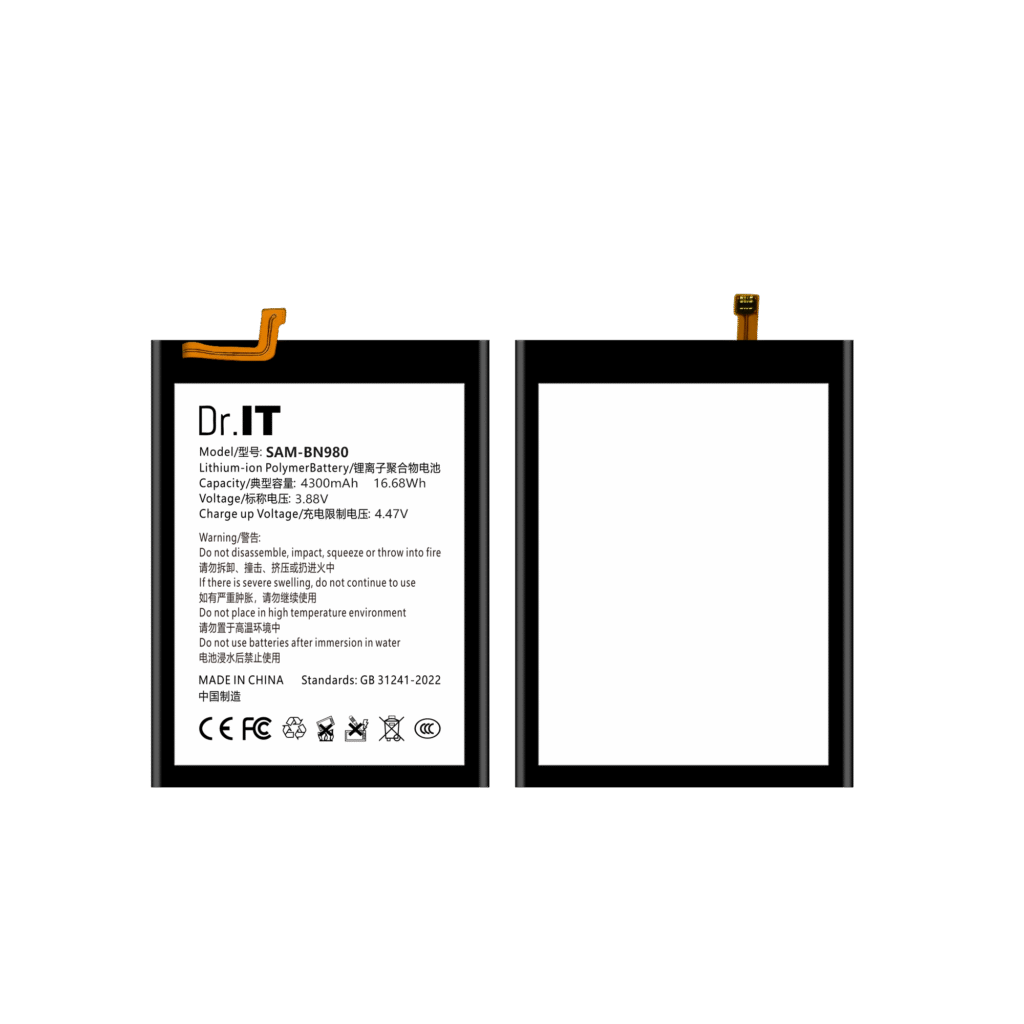
Buyers compare suppliers on price, on lead time and on reputation, and they often treat the catalogue as a list rather than as a data set. But a catalogue is exactly a data set: it is the supplier’s description of what they sell, in the form you are expected to order from. A catalogue that gives you the artwork model text, the label capacity, the nominal voltage and the charge-limit voltage lets you order accurately and check the goods on arrival. A catalogue that gives you a product name, a marketing render and a compatibility list leaves you doing the reconciliation yourself, usually after the shipment has arrived. This guide is for repair shops, distributors and OEM buyers of replacement phone batteries, and it sets out the fields to look for in any supplier’s catalogue, what each one is for, and how to audit a catalogue quickly before you commit an order.
Fields that matter, and what to do without them
| Field | Why it matters | If it is missing |
|---|---|---|
| Model code | The short reference you put on your order line | Ask for it; do not order from a product name alone |
| Artwork model text | The text printed on the cell; the only field that survives a rebrand | Treat the reference as unverifiable and request a photograph of the artwork |
| Label capacity | Which cell type the reference is | Do not assume it matches the device’s original cell |
| Nominal voltage | Whether the cell is a drop-in for the device | Ask, and confirm against the cell in the device |
| Charge-limit voltage | The charging limit, which is not the nominal voltage | Ask; without it you cannot check a cell that arrives with the wrong print |
| Watt-hour value | A cross-check on the two values above | Compute it yourself and note any disagreement |
| Original artwork image | The only image that shows what is printed on the cell | Ask for the artwork file rather than accepting a render |
| Fitment data | Whether the cell physically fits a device version | Order a sample and check it before bulk |
| Buying unit | What actually arrives in a pack | Ask what is in the unit and where the batch reference is printed |
| Evidence statement | What the specification is based on | Ask whether the figures come from the artwork, a sample or a test report |
Read the last column as a set of questions rather than as complaints. A supplier who answers all of these clearly is telling you how they work; one who answers only the first two is telling you to reconcile the rest yourself.
What an image is, and what it is not
Most replacement battery catalogues show a product image, and the image is where the data usually hides. The useful image is the original artwork of the cell: the label as it is printed, photographed flat, with the model text, the capacity, the nominal voltage and the charge-limit voltage legible. That is a record. A marketing render — a cell floating on a gradient, or a photograph of a different cell — is decoration, and it cannot be used to check anything.
The practical test is simple: can you read the four values off the image and write them onto your order line? If yes, the image is doing a job. If no, you have a picture and no specification. The battery label guide covers each field and what it means, including the watt-hour figure and the difference between the nominal and the charge-limit voltage.
The consistency check that catches most catalogue errors
Three of the fields above are related: capacity multiplied by nominal voltage should give the watt-hour figure the catalogue prints. When they agree, the catalogue is internally consistent and you can order from it. When they do not, one of the three is wrong, or the watt-hour figure was copied from another reference — which happens, and which is why the arithmetic is worth running on any reference you plan to order in volume.
The fix is not to guess which value is right. It is to specify capacity and voltage in your order, note the printed watt-hour value and the calculated one, and ask the supplier to confirm in writing which figure applies to the goods. Several references in this catalogue print a watt-hour figure that does not reconcile, and those pages say so on the page itself, because a buyer who finds the difference after the goods have shipped has no way to resolve it. The battery evidence guide sets out what a label can and cannot establish, and the model code guide explains why the numeric part of a code carries no capacity information at all.
Fitment data beats compatibility lists
A catalogue that lists devices under a reference is telling you what the supplier believes the cell fits. A catalogue that gives you the physical details — connector type, flex position, cell thickness and footprint, protection board position — is telling you how to check it yourself. The second is the more useful, because the first cannot be verified without the cell in hand.
The fitment checklist lists the physical checks in the order that catches problems fastest, and the sample approval checklist is how you turn the result into a written record before the bulk order. When you ask a supplier for fitment data, the answer should be in the same fields the checklist uses, not in the word “compatible”.
Auditing a catalogue in thirty minutes
Before placing a first order, pick five references you intend to buy and check them against the list above. For each one, write down the model code, the artwork text, the capacity, the nominal voltage, the charge-limit voltage and the watt-hour figure as printed, and check the arithmetic. Then ask three questions: is the image the original artwork, is the fitment information physical rather than a device list, and what does the specification rest on — the artwork, a sample, or a test report. Write down the answers.
Thirty minutes of that work usually exposes more about a supplier than an hour of reading their marketing pages, and it produces a usable specification for the order rather than an impression.
What this catalogue publishes, and what it does not
For clarity about the standard here: each product page in this catalogue states the catalogue model, the artwork model text as printed on the original artwork, the listed compatible brand, the label capacity, the nominal voltage, the watt-hour figure printed on the artwork, the charge-limit voltage printed on the artwork, and an evidence line saying that the values come from matching original product artwork rather than from an independent test report. Where the printed watt-hour figure does not reconcile with capacity multiplied by voltage, the page says so and recommends settling it in writing before the order.
What the pages deliberately do not state is stock position, minimum order quantities, delivery timing, warranty terms or certification claims — those are confirmed for each enquiry and for the shipment, in writing, rather than asserted in a catalogue that could be out of date by the time you read it. The OEM specification sheet guide covers the wider specification an OEM project needs, and the wholesale RFQ template turns the fields above into the enquiry you send.
Reference pages such as the BN980 (4300 mAh, 3.88 V) and the BN985 (4500 mAh, 3.88 V) show the same fields for their references. Send your model list, quantities and destination through the DoctorIT quotation page, and start from the wholesale batteries page if you are setting the terms up for the first time.
Battery installation and handling should be carried out by trained technicians, and lithium-ion batteries must be stored, transported and disposed of in line with the applicable local rules and the carrier’s requirements.