

October 24, 2026
Phone battery label explained: mAh, Wh, voltage and charge limit
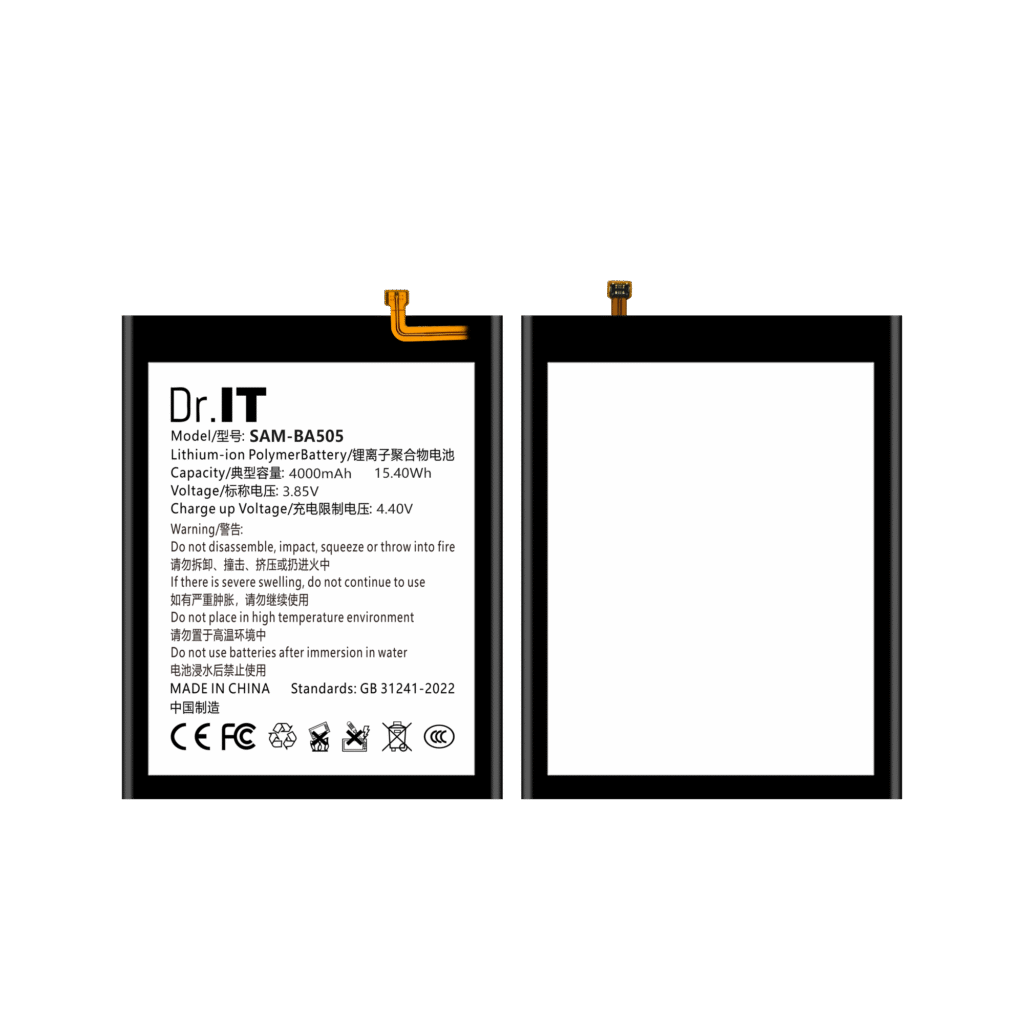
Two replacement batteries can carry the same short model code and still differ in the specification fields printed on their labels. For buyers ordering by model number, the label is usually the first document that separates one reference from another, so it is worth knowing which fields carry real information and which do not.
This guide works through the four fields that appear on almost every lithium-ion replacement battery label — capacity in mAh, energy in Wh, nominal voltage in V, and a separate charge-limit voltage — and shows how they relate to each other. The examples come from DoctorIT catalogue artwork that has been checked against the original product images, so the values below are label values, not independent laboratory measurements.
What each label field actually tells you
| Label field | What it states | What it does not prove |
|---|---|---|
| Capacity (mAh) | The charge the cell is rated to hold, in milliampere-hours. | Measured capacity, runtime in a specific phone, or cycle life. |
| Energy (Wh) | Energy in watt-hours. It is the product of capacity and voltage. | A measured discharge result or a performance guarantee. |
| Nominal voltage (V) | The rated working voltage of the cell. | Device compatibility on its own, or the maximum charging voltage. |
| Charge-limit voltage | The upper limit printed for charging protection. | The nominal voltage, and not a second capacity figure. |
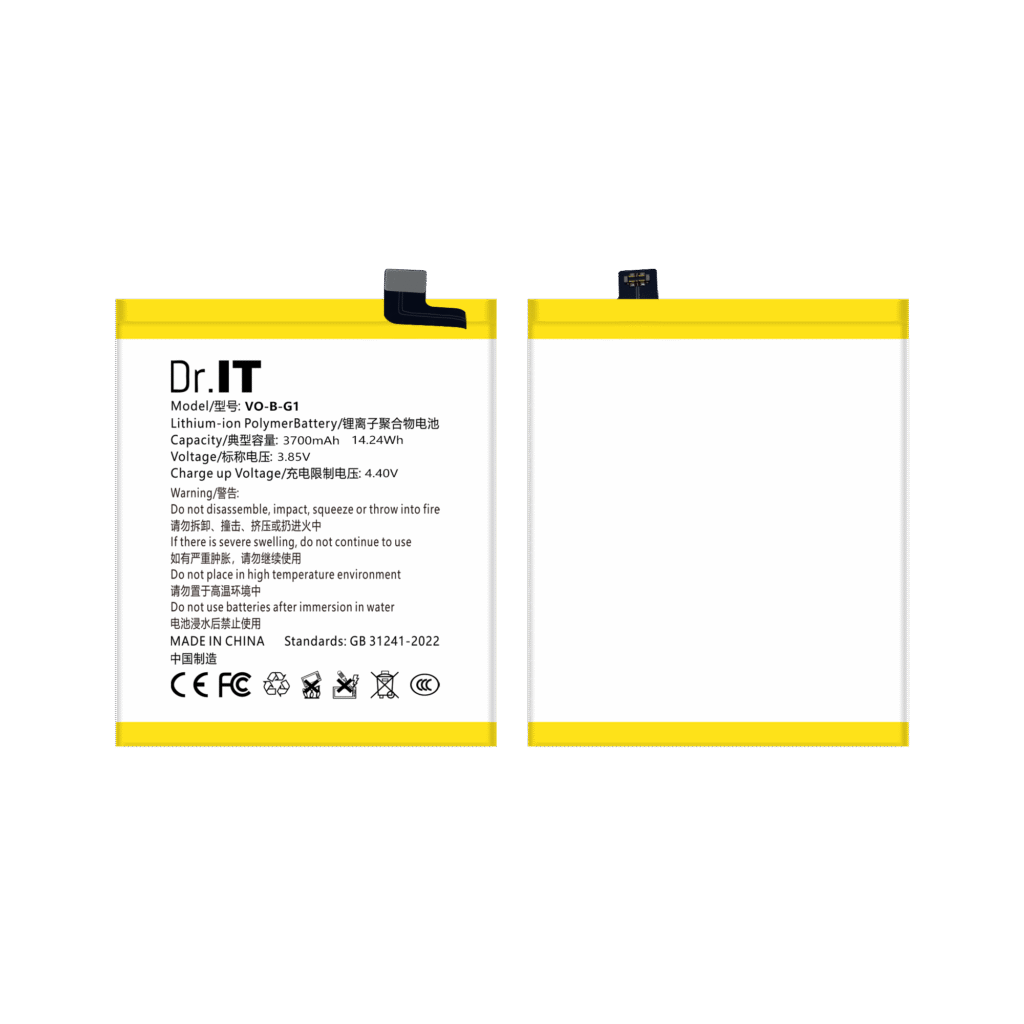
The single most common confusion in replacement-battery ordering is between the charge-limit voltage and the nominal voltage. They are different numbers printed on the same label. The DoctorIT BA505 and the DoctorIT B-G1 both carry a charge-limit value alongside a nominal voltage of 3.85 V, and the two must not be mixed up when you write a specification line for an order.
Cross-checking capacity and voltage against the Wh figure
Because watt-hours are the product of milliampere-hours and volts, you can use the printed Wh value as an arithmetic check on the other two fields. Divide the mAh figure by 1,000 to get ampere-hours, then multiply by the nominal voltage. The result should be close to the Wh figure printed on the artwork. Where it is not, that is a point to raise before an order is placed.
| Catalogue reference | Capacity (mAh) | Nominal voltage (V) | Wh printed on artwork | Wh by arithmetic |
|---|---|---|---|---|
| iPhone 13 standard capacity | 3227 | 3.84 | — | 12.39 |
| iPhone 14 standard capacity | 3279 | 3.87 | — | 12.69 |
| iPhone 15 standard capacity | 3349 | 3.876 | — | 12.98 |
| iPhone 11 standard capacity | 3110 | 3.83 | — | 11.91 |
| iPhone 11 high capacity | 3600 | 3.83 | — | 13.79 |
| iPhone 12 / 12 Pro standard capacity | 2815 | 3.83 | 13.02 | 10.78 |
| iPhone 12 / 12 Pro high capacity | 3400 | 3.83 | — | 13.02 |
| Samsung BG991 | 4000 | 3.88 | — | 15.52 |
| Samsung BA505 | 4000 | 3.85 | 15.40 | 15.40 |
| vivo B-G1 | 3700 | 3.85 | 14.24 | 14.25 |
An em dash means the watt-hour figure was not captured in our artwork evidence record at the time the product image was checked. It does not mean the artwork carries no Wh value. The watt-hour column in the right-hand column is arithmetic on the printed capacity and voltage; it is not an independent measurement.
One row in this table is worth reading twice. On the artwork for the iPhone 12 / 12 Pro standard-capacity battery, the printed energy value of 13.02 Wh does not match 2815 mAh at 3.83 V, which works out to 10.78 Wh. The same 13.02 Wh figure is what the arithmetic produces for the iPhone 12 / 12 Pro high-capacity variant at 3400 mAh. This is exactly the kind of detail that a buyer cannot detect from a product photograph alone, and it is why the artwork should be confirmed against the physical sample before a specification is signed off.
Three checks to apply to a supplier specification
- Keep the model code and the artwork text together. A short code such as BA505 or B-G1 does not identify a manufacturer part number. Record the model text printed on the artwork alongside the catalogue reference.
- Treat capacity and voltage as separate fields. A listing that gives a capacity without a nominal voltage is incomplete, and one that gives only a voltage cannot be compared with another offer.
- Run the watt-hour check before approval. If the printed Wh value does not agree with capacity times voltage, ask the supplier which figure describes the battery being supplied, and keep the answer in writing.
What a label value cannot settle
Label values are catalogue data. They do not establish certification status, measured capacity, cycle life, runtime in a particular handset, device-brand authorization, or the commercial terms of an order. Those points belong in the written quotation and the sample approval record rather than in a product photograph. If a term matters to your business — minimum order quantity, lead time, warranty, documents for import — request it explicitly through the DoctorIT quotation page so the answer is attached to the enquiry.
Recording the specification for repeat orders
Once a configuration is approved, keep the label values in a structured form so that a repeat order can be placed without re-deriving them. The sample approval checklist is designed for exactly that purpose: it captures the specification, the evidence used, the points still open, and the version that was approved. The mixed-model order list keeps one line per battery reference, and the wholesale RFQ template separates product, packaging and shipping scope so unanswered questions stay visible in a comparison.
To see how these label values appear on individual catalogue references, review the BA505, the B-G1, the iPhone 13 standard capacity battery and the Samsung BG991 in the full battery catalogue. Every figure used in this guide comes from DoctorIT original product artwork. It is a specification reference for purchasing decisions, not a durability, safety or performance claim, and installation and handling of lithium-ion batteries should be carried out by trained technicians.
The battery evidence guide sets out which parts of a label can be checked on arrival, and which parts need a document or a stated method.
The catalogue data guide lists the label fields worth checking in any supplier’s catalogue, and the arithmetic cross-check that catches copied values.
The label language and the warning text are not the same across the families in the catalogue; the packaged and bulk guide shows what the artwork prints in each.