

October 21, 2026
Phone battery packaging artwork approval checklist
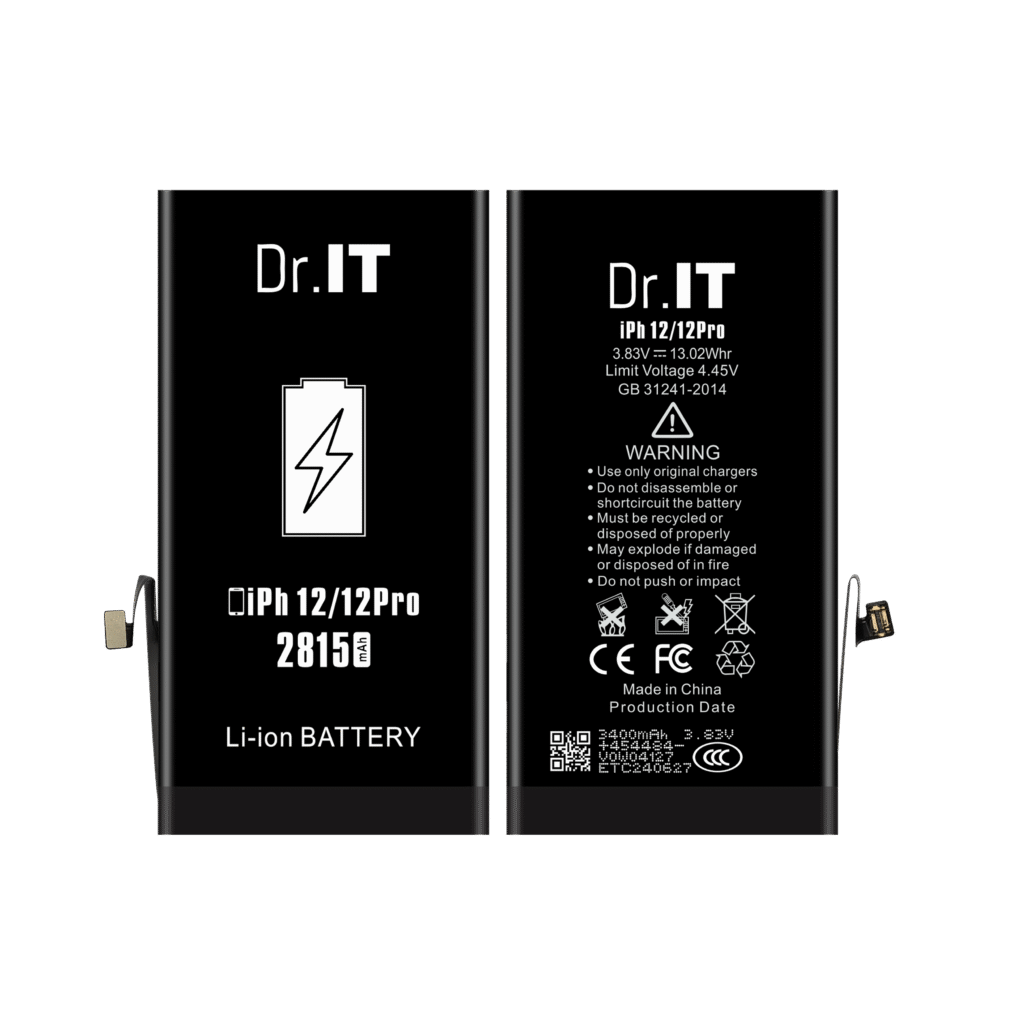
A phone battery packaging artwork approval should identify one battery variant, one set of print files and one written release decision. A message saying “the design looks good” leaves too much unresolved when standard-capacity and high-capacity versions share a device name.
Use the worksheet below before releasing labels, boxes or inserts for printing. It is a purchasing record, not a certificate, a product test or confirmation that every requested packaging service is available. Agree the project scope through the DoctorIT private-label enquiry.
Separate product identity from the artwork decision
Start with the exact product URL and capacity variant. Keep the buyer’s internal SKU in another field so it does not replace the supplier reference. Then name the battery label, unit box, insert and carton files separately. A shared brand design can still require different model-specific text.
The existing private-label project guide covers the overall brief and approval sequence. This worksheet handles the narrower handoff: which files can be printed, which evidence supports their text and what must be checked again after a change.
A real example: one device name does not fix the printed specification
The current DoctorIT iPhone 12/12 Pro catalogue has separate standard-capacity and high-capacity references. The matching original images show these front-face capacities and nominal voltages:
| Product reference | Front capacity | Nominal voltage | Artwork review action |
|---|---|---|---|
| iPhone 12/12 Pro standard capacity | 2815 mAh | 3.83 V | Keep this variant distinct; resolve the energy-value discrepancy before releasing new print files |
| iPhone 12/12 Pro high capacity | 3400 mAh | 3.83 V | Do not reuse the standard-capacity label or box text without review |
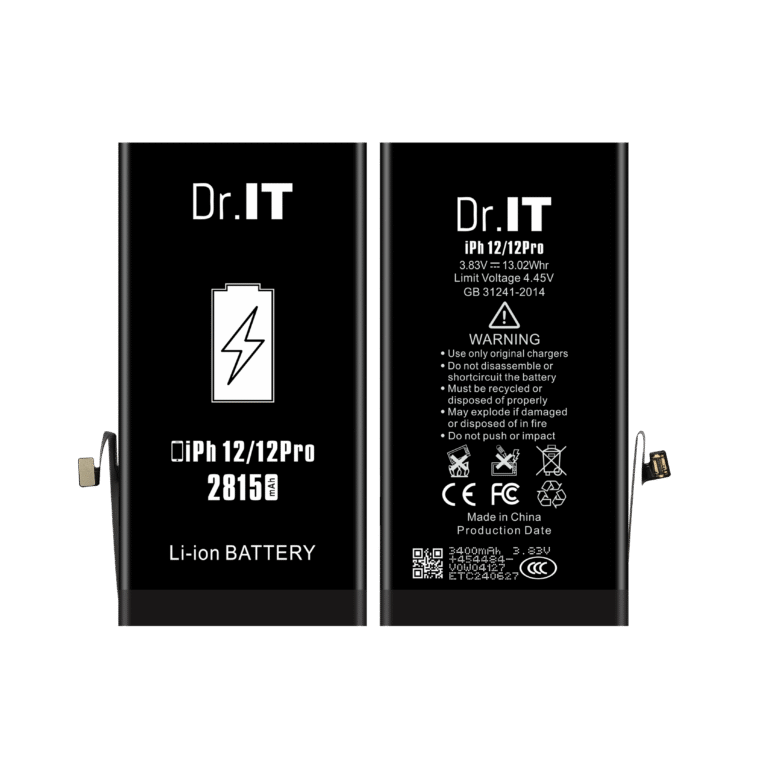
For an arithmetic consistency check, 2.815 Ah × 3.83 V is approximately 10.78 Wh. That calculation is not measured energy. The discrepancy is a reason to request a corrected, confirmed proof rather than copying every number from a photograph into another file. The front-face capacity and nominal voltage are the catalogue reference used here.
A photograph also does not establish that printed marks are supported for your order. Keep any proposed certification or performance statement out of the released file until the responsible reviewer has the evidence for that exact product and wording.
Copy this packaging artwork release worksheet
Use one record for each product-and-packaging combination. Blank fields mean unresolved, not approved. The example filenames below illustrate a naming method; they are not DoctorIT production files or approved packaging options.
| Record field | What to enter | Release check |
|---|---|---|
| Product and buyer SKU | Product URL, capacity variant, internal SKU, order line | Every file identifies the same requested item |
| Confirmed text source | Specification reference, date and unresolved differences | No disputed rating is copied into a released proof |
| Battery label file | Exact filename and revision, for example SKU-LABEL-R02.pdf | Text and orientation match the confirmed variant |
| Unit box and insert | Separate filenames, revisions and supplier-confirmed drawing references | Review at actual size; confirm the packed sample where required |
| Identifiers and languages | Approved SKU/code data, language files and reviewer | Decoded data returns the intended item; copy has been checked |
| Carton and packing reference | File revision and agreed contents reference | Model and quantity information agree with the order |
| Decision | Hold or release, approver, date, exact files and effective order | Unresolved items stay on hold; superseded files are withdrawn |
Check the exported proof, then the assembled pack
Review the file that will actually be sent to print, not only an editable design or a screen mockup. Confirm the printer’s drawing reference and actual-size proof. Ask the supplier which dimensions, materials and print checks it needs; do not assume a previous model’s template fits another battery.
For coded labels, compare the encoded data with the approved SKU mapping and check the printed sample in the receiving workflow. A correct-looking code is not proof that it identifies the right capacity version. If no barcode is needed, mark the field “not applicable” rather than inventing a number.
Record an assembled-pack review separately where the project requires one. A visual artwork approval does not confirm battery fit, protection or performance. Link the product sample approval record without treating it as automatic approval of the packaging.
Reopen the affected checks when a file changes
Changing a capacity value affects every place it is printed. Changing a buyer SKU can affect codes, receiving records and carton text. A revised insert or drawing requires another fit review. Log the changed field, affected files and person responsible before issuing a new release.
Keep the previous revision for the record, but tell the supplier which files are withdrawn from production. If old printed materials remain, record their disposition instead of assuming they can be mixed into the next order. Give repeat orders the same review when the product, destination, wording or packaging changes.
The fitment check decides whether the specification on the artwork matches the device in front of you — the phone battery fitment checklist sets out the five points to confirm before a bulk order.
Send a model-specific packaging brief
Include the product links, quantity per variant, destination, requested packaging and current artwork files. Identify open specification questions. Use the RFQ template to keep requested packaging costs and approvals visible in the quotation.
Artwork approval sits inside a wider specification; the OEM specification sheet guide shows where labelling, packaging and acceptance fit together.
The buying unit guide sets out what a unit must state in writing, from what is in it to where the batch reference is printed.
Packaging is part of the family, not a detail on top of it: the packaged and bulk guide sets out how the printed box, the label language and the warning text differ between the two.