

October 28, 2026
How to read phone battery model codes before you order
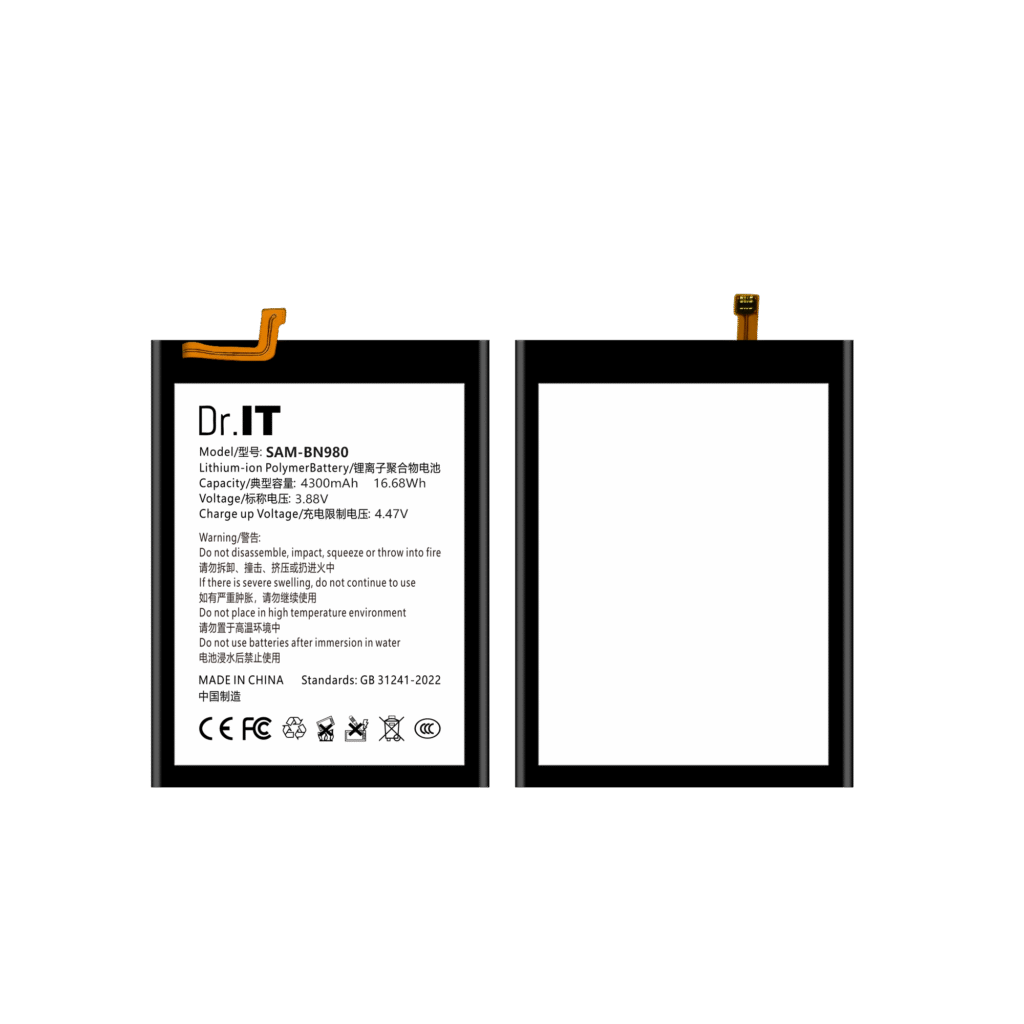
Ordering replacement batteries by model code is efficient right up to the point where a code is ambiguous. The same short code can exist for more than one cell, the numeric part of a code says nothing about capacity, and the code on a catalogue page is not always the code printed on the artwork. Buyers who lose track of that distinction end up comparing two batteries that cannot be substituted for each other, or ordering a reference that does not exist in the supplier’s own range.
This guide explains how to read a phone battery model code before an order is placed, using verified examples from the DoctorIT catalogue. It is written for buyers and repair technicians who order by code and need to know, quickly and reliably, whether two references are the same part.
Read the artwork text, not only the short code
Every DoctorIT catalogue reference pairs a short catalogue code with the model text printed on the artwork. Both belong in your order lines, your stock records and any comparison you make between suppliers.
| Catalogue code | Model text on artwork | Listed family | Label capacity | Nominal voltage | Energy printed on artwork |
|---|---|---|---|---|---|
| BG990 | SAM-BG990 | Samsung | 4500 mAh | 3.86 V | 17.37 Wh |
| BG781 | SAM-BG781 | Samsung | 4500 mAh | 3.86 V | 17.37 Wh |
| BN980 | SAM-BN980 | Samsung | 4300 mAh | 3.88 V | 16.68 Wh |
| BN970 | SAM-BN970 | Samsung | 3500 mAh | 3.85 V | 13.48 Wh |
| BS918 | SAM-BS918 | Samsung | 5000 mAh | 3.88 V | 19.40 Wh |
| BG975 | SAM-BG975 | Samsung | 4100 mAh | 3.85 V | 15.78 Wh |
| BA505 | SAM-BA505 | Samsung | 4000 mAh | 3.85 V | 15.40 Wh |
| B-G1 | VO-B-G1 | vivo | 3700 mAh | 3.85 V | 14.24 Wh |
| B-G7 | VO-B-G7 | vivo | 5000 mAh | 3.85 V | 19.25 Wh |
| HB366481ECW | HW-HB366481ECW | Huawei | 3000 mAh | 3.82 V | 11.46 Wh |
Two things in that table are worth stating plainly. First, the prefix on the artwork separates device families: SAM- appears on the Samsung references here, VO- on the vivo references and HW- on the Huawei one. That is a naming pattern in this catalogue, not a universal standard, so it helps you spot an obvious mismatch but it does not prove a battery fits a device. Second, the numeric part of a code carries no capacity information — compare BG990 and BG781 above: both are 4500 mAh, but so are codes with different numbers and different capacities, and BN970 is 3500 mAh with a similar-looking code. Only the label values tell you what a reference is.
Four checks before you add a code to an order
| Check | What to compare | Why it matters |
|---|---|---|
| Code against artwork text | Catalogue code and the model line on the battery | Catches a catalogue error or a substitution before shipment |
| Family prefix | SAM-, VO-, HW- and the listed device family | Flags a reference from the wrong device family immediately |
| Capacity and nominal voltage | Both values, as separate fields | Two codes can differ only in these numbers |
| Charge-limit voltage | Kept as a third, separate field | It is a different number from the nominal voltage and is easily written into a specification by mistake |
These are the same fields that appear on the label itself, and our guide to reading a replacement battery label explains each of them, including a worked example of a catalogue label whose watt-hour value does not agree with its own capacity and voltage. The physical side of the comparison — connector, dimensions, device version — is covered by the fitment checklist.
Codes are references, not compatibility claims
A model code identifies a part. It does not, on its own, establish that the part fits a particular handset, and it does not tell you which device versions the same code covers. Treat any compatibility list as a claim to be checked against the physical reference you have verified, not as a substitute for checking it.
For that reason, each catalogue page states the label values of the reference it describes — capacity, nominal voltage, the energy printed on the artwork and the separate charge-limit value — so that two references can be compared like for like without guessing: the BG990, the BN980, the BN970, the B-G7 and the HB366481ECW are typical examples. Every figure quoted in this guide comes from DoctorIT original product artwork; none of them is a measured test result, a certification claim or a device-brand authorisation.
Keep the code, the artwork text and the values together
The simplest habit that prevents most ordering errors is to keep all three in one place per model: the catalogue code, the artwork text and the label values. When the reference is used again — in a mixed order list, in a sample approval record, in a repeat order — nothing has to be re-derived and nothing has to be remembered.
The mixed-model order list keeps one line per reference, the sample approval checklist captures the configuration you accepted, and the wholesale RFQ template lets you ask several suppliers for the same specification. When you send a model list for quotation, include the artwork text as well as the code; it removes an entire class of clarification emails.
Send your model list, quantities and destination through the DoctorIT quotation page, and keep the confirmation with the model record. Availability, order minimums, delivery timing and after-sales conditions are confirmed in writing for each enquiry. Battery installation and handling should be carried out by trained technicians.
If the reference is not listed anywhere you buy from, the unlisted reference guide covers how to identify it from the cell, verify fit and request it in a structured way.
The catalogue data guide explains why a catalogue that lists only codes is hard to order from, and what to ask for instead.
The prefix in the model text identifies the artwork family as well as the brand, which is why it is written out on the order line; the packaged and bulk guide explains why.