

November 16, 2026
Charge-up voltage: the second voltage on a battery label and why it matters
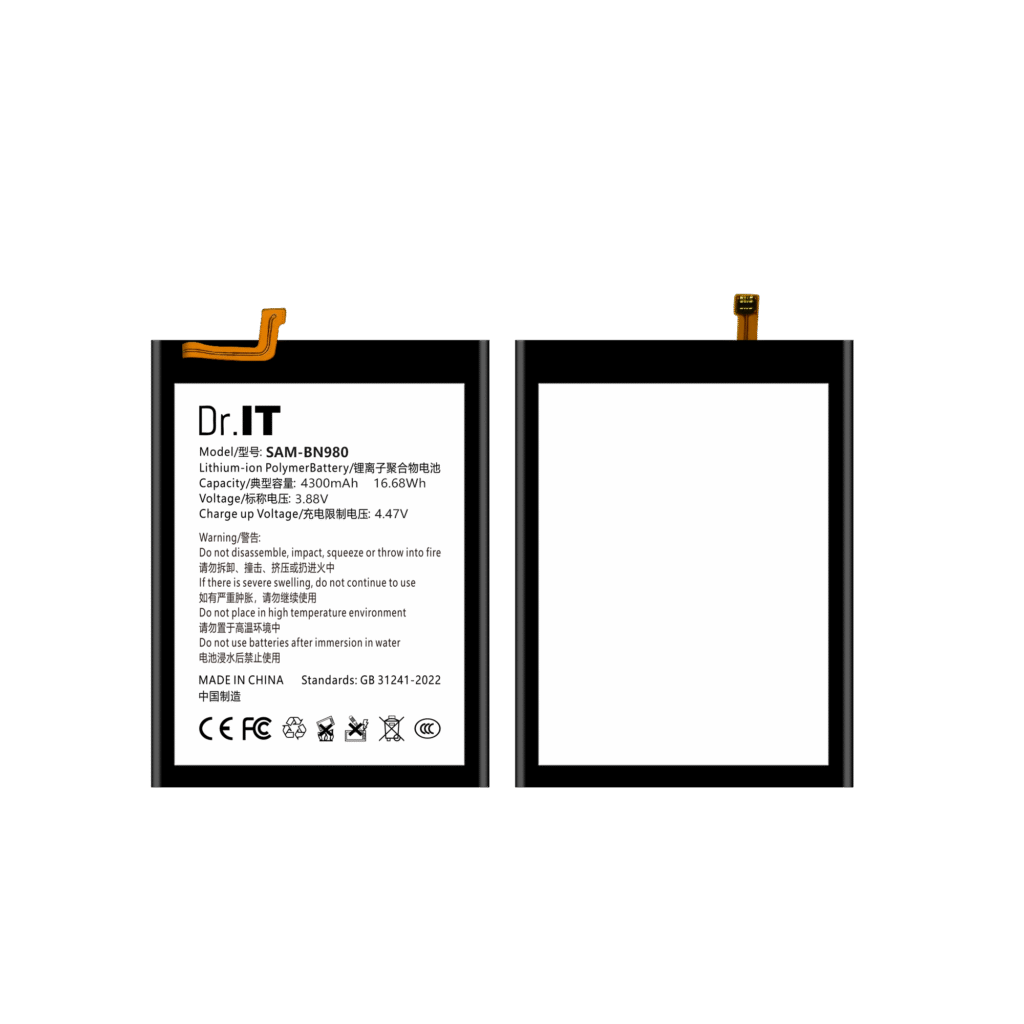
A replacement battery label carries two voltages, and they are not the same number. The nominal voltage is the plateau the cell sits at while it discharges. The charge-up voltage, printed on the same block of artwork, is the voltage the cell is charged up to. They sit close together, which is exactly why the second one gets overlooked — and it is the number that decides whether a device charges a cell properly, refuses to charge it, or stops early with the percentage stuck. This guide is for repair businesses, distributors and OEM buyers of replacement phone batteries. It explains what the two printed voltages mean, what the differences look like across the references in this catalogue, what to check at the bench when a device will not charge, and why the charge-up voltage belongs in the order file next to the capacity. Every example used here is read from the original artwork published for that reference on this site, and calculated values are labelled as calculated.
Two voltages, two different jobs
The nominal voltage is the working voltage of the cell: the level it holds across most of its discharge, and the figure that pairs with the capacity to give the energy in watt-hours. The charge-up voltage is the ceiling the charging circuit brings the cell up to before it stops. On the artwork in this catalogue it is printed on its own line, labelled as the charge-up voltage or the charge-limit voltage, and it is always the higher of the two numbers.
That ordering is not a coincidence: a lithium-ion cell has to be pushed above its nominal plateau to reach a full charge, and the amount it is pushed depends on the chemistry and the cell design rather than on the device. The device’s charging circuit manages the process, and the cell’s own printed limit is the boundary it should not be pushed past.
What the catalogue actually shows
| Reference | Family | Nominal voltage printed | Charge-up voltage printed | Difference |
|---|---|---|---|---|
| BA520, BN920, BA146, WT-N30, BG977 | Samsung, bulk cell | 3.85 V | 4.40 V | 0.55 V |
| BA217 | Samsung, bulk cell | 3.85 V | 4.40 V | 0.55 V |
| B-B9, B-G5 | vivo, bulk cell | 3.85 V | 4.40 V | 0.55 V |
| B-Z5 | vivo, packaged retail | 3.85 V | 4.40 V | 0.55 V |
| HB396689ECW, HB476586ECW | Huawei, bulk cell | 3.82 V | 4.40 V | 0.58 V |
| B-M3, B-K6 | vivo, packaged retail | 3.87 V | 4.45 V | 0.58 V |
| HB416492EFW, HB466489EFW | Huawei, bulk cell | 3.87 V | 4.45 V | 0.58 V |
| BS711, BS926 | Samsung, bulk cell | 3.88 V | 4.47 V | 0.59 V |
| B-V7 | vivo, packaged retail | 3.89 V | 4.48 V | 0.59 V |
Two things stand out. The first is that the difference between the two printed voltages is not fixed: across the references read here it runs from about 0.55 V to about 0.59 V, so it cannot be derived from the nominal voltage. The second is that both the nominal voltage and the charge-up voltage move together — a 3.89 V cell here is paired with a 4.48 V limit, and a 3.85 V cell with 4.40 V — which means that a cell with a different nominal voltage is usually a cell with a different charge behaviour as well.
What to check when a device will not charge
“It does not charge” is a symptom with several possible causes, and the battery is only one of them. The order that keeps the diagnosis honest is: check the device first, then the pack, then the cell.
- The charging path. Check the cable, the charger and the port before blaming the battery. A device that draws no current at all is rarely a cell fault.
- The pack. Check the connector and the flex, and check whether the device reports a swollen or overheated battery.
- The cell. Compare the cell’s printed nominal voltage and charge-up voltage with the reference specification for that device. A cell with a lower charge-up voltage than the device expects can leave the battery percentage stuck at a lower reading, because the charging circuit stops early.
- The measurement. With a multimeter on the battery connector, the terminal voltage while the device is on charge can be compared with the printed charge-up voltage. A reading that stays well below the printed limit points at the charging path or the device rather than at the cell.
Measurement at the connector is work for a trained technician, and the fitment checklist sets out the checks that belong before a bulk order rather than at the counter. If a cell arrives swollen, punctured or warm, the damaged battery guide comes first, because handling comes before diagnosis. The label field guide covers the rest of the printed fields and the capacity and watt-hour guide covers why the capacity and the energy need to be read together.
Why a substitution needs more than a matching capacity
Two references can carry the same capacity in milliampere-hours and still differ on the charge-up voltage, and that difference is invisible unless it is written down. A substitution that matches on capacity and artwork text but not on charge-up voltage can change how the device charges and how full the battery reads, and the symptom appears at the customer’s device rather than in your warehouse.
So the order line and the fitment record should carry the nominal voltage and the charge-up voltage together with the artwork model text, and a substitution should be checked against all three before it is fitted. The artwork prefix guide covers why the artwork text is the reliable part of the record, and the packaged and bulk guide covers the cases where two families of the same reference exist with different artwork.
For distributors: it belongs in the order file
For a distributor, the charge-up voltage is not a bench value — it is a line in the order file, because it is one of the things that has to match when the same reference is reordered. A reference list that carries the catalogue code, the artwork model text, the capacity, the nominal voltage, the charge-up voltage and the printed energy leaves nothing to interpret on the next order. The repeat order guide covers standardising that file, and the stock planning guide covers keeping the reorder point against the reference you actually sell.
For OEM and private-label work, the specification has to state the charge-up voltage as well as the nominal one, because the pack artwork is what carries it. The OEM specification sheet guide covers the fields to state, and the OEM and private label page covers the project sequence.
Product pages such as the BN980 (4300 mAh, 3.88 V) and the BN985 (4500 mAh, 3.88 V) publish the artwork model text and the printed values for their references, and the battery catalogue carries the rest of the range. Send your model list, quantities and destination through the DoctorIT quotation page, and start from the wholesale batteries page if you are setting the terms up for the first time.
Battery installation and handling should be carried out by trained technicians, and lithium-ion batteries must be stored, transported and disposed of in line with the applicable local rules and the carrier’s requirements.